Enquire Now
Choosing a computer course can be confusing for students after school or college. A well-structured ADCA Computer Course can introduce learners to office applications, accounting tools, databases, graphic design, internet use, and other practical computer skills. ADCA is often considered by students who want a job-oriented computer qualification without entering a highly specialized technical program. However, the actual syllabus, duration, fees, and certification can vary between institutes. Understanding these factors can help students choose a suitable program based on their learning goals.
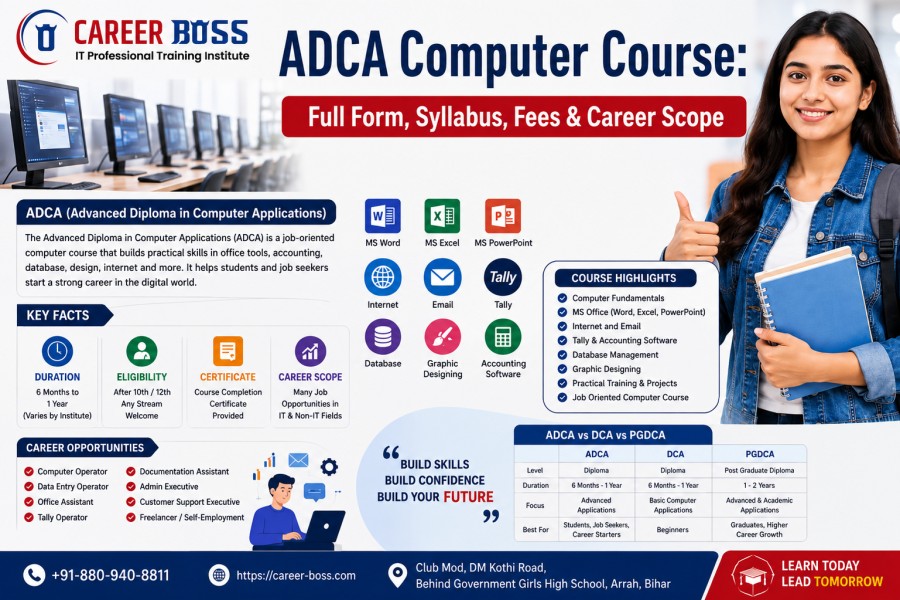
ADCA generally stands for Advanced Diploma in Computer Applications. It is a computer application program designed to develop practical knowledge of commonly used digital tools and applications.
Unlike basic computer literacy courses, an Advanced Diploma in Computer Applications may cover several areas together. These can include office productivity, accounting software, database management, internet applications, graphic designing, and computer fundamentals.
The purpose is not only to teach software names. Students should also learn how to use these applications for practical tasks such as preparing documents, creating spreadsheets, managing information, making presentations, and handling digital communication.
The ADCA Course Full Form is Advanced Diploma in Computer Applications. It is generally aimed at learners who want broader computer application knowledge.
An ADCA program can be useful for beginners, students, job seekers, and people who want to improve their workplace computer skills. The course may also provide a foundation for further learning in areas such as accounting, graphic design, office administration, and digital services.
Since there is no single syllabus followed by every training provider, students should always check the curriculum before admission.
Here are the main points students should understand before joining:
These details can change from one institution to another, so students should verify them before enrollment.
The ADCA Course Syllabus can contain multiple modules. The exact subjects depend on the institute and course level.
Computer Fundamentals generally introduce hardware, software, operating systems, file management, storage, and basic troubleshooting concepts.
This module helps beginners understand how computers work and how to manage common tasks.
MS Office is commonly associated with office productivity training. Students may learn:
These applications can be useful in education and many office environments.
Internet and Email training can cover web browsing, email communication, file attachments, online searches, and basic digital safety.
Students can also learn how to manage digital information responsibly.
Some programs include Tally or other Accounting Software. Students may learn basic accounting concepts, transactions, reports, and business records.
However, Tally is not necessarily part of every ADCA curriculum. Students should confirm the software included before admission.
Database Management introduces learners to organized information storage. Depending on the course, students may learn basic database concepts, records, fields, tables, and data handling.
Graphic Designing may also be included in some programs. Students can learn basic visual design principles and create simple promotional or informational materials.
Traditional computer application training usually focuses on software skills and office applications. Modern programs may also introduce learners to digital productivity, online collaboration, information verification, and responsible use of AI tools.
AI can help with tasks such as brainstorming, summarizing information, creating drafts, or improving productivity. However, students still need human judgment to check accuracy and make final decisions.
A modern learning approach should therefore combine basic computer knowledge with practical projects, digital awareness, and responsible technology use.
For example, students at Career Boss Institute can evaluate how practical training, updated computer skills, and real-world assignments fit their learning goals before choosing a program.
ADCA Course Eligibility depends on the institute. Some programs may accept beginners, while others may have specific educational requirements.
Students interested in an ADCA Course After 10th can explore programs that accept learners at this level. Similarly, an ADCA Course After 12th can be considered by students looking for additional computer skills after completing school.
The course may also suit:
Checking the official admission requirements is important before joining.
ADCA Course Fees depend on several factors. Course duration, practical classes, software coverage, study materials, projects, certification, and instructor support can all affect the total cost.
There is no universal fee applicable to every ADCA program. Students should compare the complete curriculum rather than selecting a course only because it has a lower price.
Ask about practical sessions, examination charges, study materials, certification fees, and other possible costs before admission.
ADCA Career Scope depends on skills, experience, location, employer requirements, and additional qualifications. Completing a course does not automatically guarantee employment.
Possible roles may include:
ADCA Job Opportunities can increase when learners combine course knowledge with practical experience. For example, spreadsheet skills can support office work, while accounting software knowledge may help with basic accounting-related tasks.
Salary also varies significantly by employer, location, experience, and job responsibilities. Students should avoid relying on fixed salary promises when selecting a course.
Students should research a training provider carefully before admission. A good comparison should include the syllabus, practical training, software coverage, course duration, fees, certification, trainer experience, assignments, and learning support.
Searches such as ADCA Computer Centre in Ara – Complete Guide for Students can help learners understand the local training landscape. Similarly, queries like Best 10 Computer Centres in Arrah Which is Right For You and Why? reflect an important question: which program actually matches the student's needs?
Instead of choosing only by advertisements, students should compare what each program teaches and how much practical experience it provides.
An ADCA program can help learners develop useful computer application skills. These may include document preparation, spreadsheet management, presentations, digital communication, basic accounting software use, data handling, and graphic design.
The ADCA Course Benefits can be more meaningful when students complete practical assignments instead of studying only theory.
A strong Computer Skills Training program should encourage learners to practice regularly and apply their knowledge to realistic tasks.
Students often search for an ADCA Computer Centre, Coaching, Institute & Training: Complete Guide for Students before deciding where to study.
A suitable training environment should provide clear lessons, practical sessions, assignments, trainer guidance, assessments, and opportunities to apply learned skills.
Students should also understand whether the ADCA Course Certificate is issued after completing the required assessment. Certification can document course completion, but practical knowledge and actual skills remain important for long-term development.
DCA generally focuses on computer applications at a diploma level. ADCA usually offers a broader combination of application-based subjects, although the exact depth depends on the institution.
PGDCA is generally a postgraduate-level program and may be more suitable for graduates seeking advanced academic computer application education.
The right choice depends on educational background, career goals, course depth, time commitment, and eligibility. Students should compare actual curricula instead of selecting a course only because of its name.
For students seeking practical computer knowledge, an ADCA Computer Course can be a useful option when its syllabus matches their goals. It can introduce learners to office applications, accounting tools, databases, internet services, graphic design, and other computer-based skills.
Before admission, compare course modules, practical training, duration, fees, certification, and learning support. Also consider whether the program provides skills that can be applied to real tasks.
The best course is not necessarily the one with the most subjects. It is the one that provides relevant learning, practical experience, and a clear path for continued skill development.
If you are considering ADCA in 2026, research available programs carefully, ask questions about practical training, and choose a learning environment that supports your specific academic or career objectives.
ADCA stands for Advanced Diploma in Computer Applications. It is a computer application course that covers practical digital and office skills.
Common subjects include Computer Fundamentals, MS Word, MS Excel, MS PowerPoint, Internet and Email, Tally, Database Management and Graphic Designing. The syllabus can vary by institute.
Students, beginners, and job seekers can consider ADCA training. Eligibility may vary by institute. Some programs accept students after Class 10, while others may prefer Class 12 completion.
Course duration depends on the institute and syllabus. Some programs are designed as short-term courses, while others provide more extensive practical training over a longer period.
ADCA Computer Course skills can support roles such as computer operator, office assistant, data entry-related work, documentation assistant, and accounting software assistant. Career opportunities depend on skills and experience.
Students should compare the syllabus, practical training, course duration, fees, software coverage, certification, trainer experience and project work before choosing an institute.
Copyright © 2026. Career-Boss. All rights reserved.